
Most gamers think skill is the ultimate upgrade.
But if your back aches after an hour, your wrists burn mid-match, or you feel mentally drained before the final round, your setup may be holding you back more than your mechanics ever could.
You’re here because you want more than flashy RGB and a bigger monitor. You want a space that sharpens focus, supports long sessions, and actually elevates performance. This guide goes beyond aesthetics to help you build an ergonomic gaming setup that functions as a true high-performance command center.
We’ve analyzed thousands of hours of pro-level gameplay and applied proven ergonomic principles used in high-stakes esports environments. What follows is a clear, actionable framework to reduce fatigue, prevent long-term strain, and unlock your real in-game ceiling.
Comfort isn’t a luxury. It’s a competitive advantage.
The Foundation: Ergonomics for Gaming Endurance
Your Chair: The Most Important Piece of Gear You Own
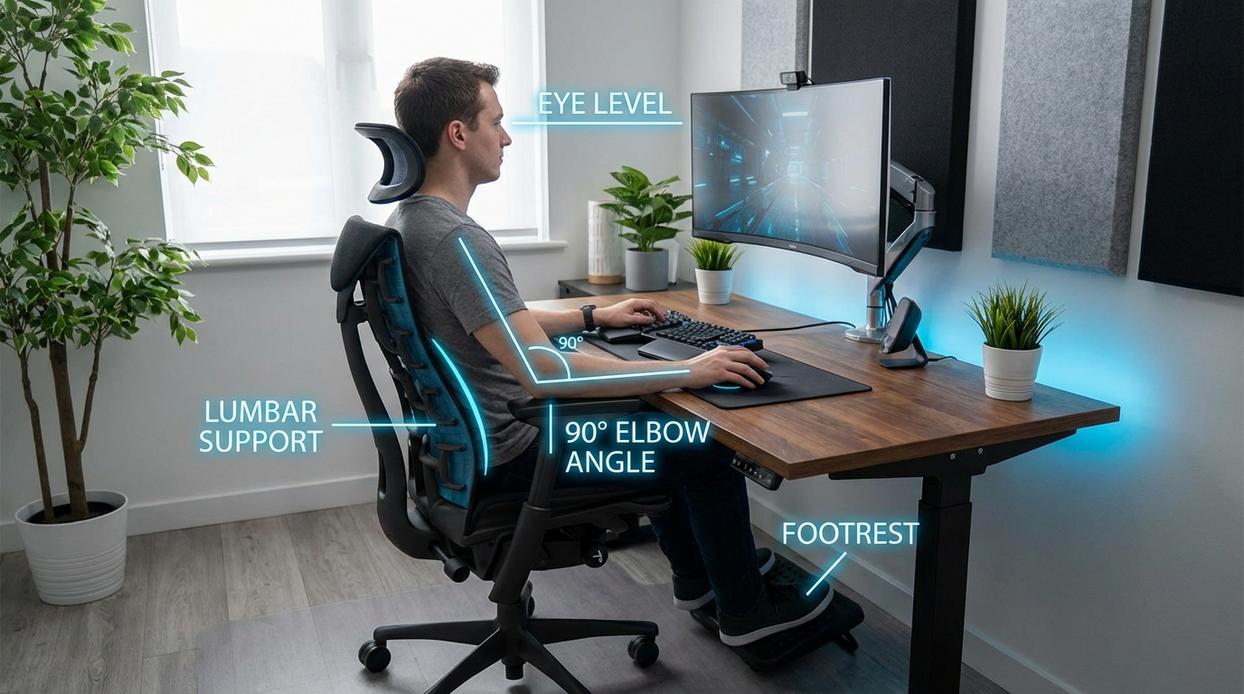
If you’re grinding ranked for four hours straight, your chair matters more than your mousepad (yes, even if it’s limited edition). The goal is simple: maintain a neutral posture—meaning your spine stays naturally aligned, not hunched like you’re dodging arrows in a medieval siege.
Neutral posture reduces strain on your spine, neck, and shoulders. According to the Occupational Safety and Health Administration (OSHA), poor seated posture increases the risk of musculoskeletal disorders over time. That’s not just office talk—it applies to gamers just as much.
Here’s what to look for:
- Adjustable lumbar support (supports the natural inward curve of your lower back)
- 4D armrests (move up/down, forward/back, and in/out)
- Seat height and depth adjustment
Now apply the 90-Degree Rule step by step:
- Sit back fully in your chair.
- Adjust height so your feet are flat on the floor.
- Set knees at a 90-degree angle.
- Adjust armrests so elbows rest at 90 degrees, level with your desk.
Pro tip: If your feet dangle, use a footrest. Stability improves reaction time (and comfort).
The Desk: Your Battlefield’s Surface
Height is non-negotiable. Your desk must let you keep that 90-degree elbow angle without shrugging your shoulders. If you’re lifting your shoulders to reach your mouse, your setup is fighting you.
Adjustable-height desks are the gold standard for an ergonomic gaming setup because they let you fine-tune positioning—or even stand between matches.
Depth matters too. You need enough space to keep your monitor about an arm’s length away (a guideline supported by the American Optometric Association to reduce eye strain) while still allowing full-range mouse movement.
If your desk forces cramped swipes, your aim—and your posture—will suffer.
Input Mastery: Connecting Player to Game
Mechanical skill isn’t just about reflexes. It’s about how efficiently your body translates intent into on-screen action (yes, your wrists matter more than you think).
Keyboard and Mouse Placement for Flawless Execution
The Straight Wrist Doctrine: Keep your wrists as neutral as possible—meaning straight, not bent up, down, or sideways. According to the Occupational Safety and Health Administration (OSHA), prolonged wrist extension or flexion increases the risk of strain and repetitive stress injuries. In gaming terms, that strain translates to fatigue—and fatigue slows reaction time. Even a 50–100 ms delay can decide a round in tactical shooters.
To Wrist Rest or Not: Wrist rests can help maintain neutral alignment, but some esports athletes avoid them because they restrict micro-adjustments. A small study in Applied Ergonomics found that static wrist support reduced extension but increased pressure points. In other words, test both approaches during aim drills and track accuracy over a week (pro tip: use aim trainers to log consistency scores).
Find Your Perfect Fit: Mouse shape matters. Research published in Human Factors shows mismatched device sizing increases muscle activity in the forearm. Palm grip users typically prefer larger mice, while fingertip players benefit from lighter shells for rapid corrections.
Optimizing Your Aiming Surface
More Space, Better Aim: Low-sensitivity players rely on large mousepads for wide, controlled movements. A 2022 analysis of professional FPS players by ProSettings.net found most use eDPI ranges between 200–400—requiring significant desk space for full-arm aiming.
Dialing in Your eDPI: eDPI (effective dots per inch) equals your mouse DPI multiplied by in-game sensitivity. For example, 800 DPI × 0.5 sensitivity = 400 eDPI. Lower eDPI improves precision but demands consistency. Test in controlled matches, adjust incrementally, and evaluate headshot percentages over time.
Ultimately, an ergonomic gaming setup isn’t about comfort alone—it’s measurable performance insurance. And once your input is dialed in, layer it with smart positioning and sound awareness using these audio optimization tips for immersive and competitive gaming.
Your Environment is Part of Your Skill
You came here looking for a way to level up your performance beyond mechanics and reaction time. Now you have a complete blueprint for building an ergonomic gaming setup that supports both your physical well-being and your in-game execution.
Too many players ignore the aches, stiffness, and fatigue that quietly sabotage their focus. That discomfort isn’t random—it’s a signal that your environment is working against you. When your chair height is off or your monitor forces you to strain, your performance pays the price.
By systematically correcting those flaws, you remove the hidden barriers holding you back. A comfortable player is a focused and consistent player. These adjustments aren’t just about feeling better—they’re a direct investment in your competitive edge.
Start now. Adjust your chair height or reposition your monitor today. One small change can unlock sharper focus, longer sessions, and better results.